Als u gaat scheiden, dan wordt bij het vaststellen van de hoogte van alimentatie bepaald wat uw financiele “draagkracht” is. Deze draagkracht is vaak netto, en wordt vervolgens teruggerekend naar een bruto draagkracht volgens de “methode Buijs”. De achterliggende berekening is echter vaak ook voor uw adviseur niet goed te volgen en het resulterende bedrag lijkt “magisch”. Dit kan om veel geld gaan, daarom hieronder een rekenvoorbeeld en uitleg zodat u het ook snapt.
In onderstaand rekenvoorbeeld gaan we uit van een inkomen van €50.000, zonder bijzonderheden. We berekenen het netto besteedbaar inkomen dat overblijft na belastingen, berekenen op basis daarvan netto alimentatie, en rekenen die terug naar bruto alimentatie:
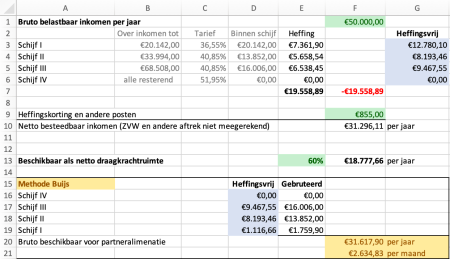
Bij een belastbaar inkomen van €50.000 (ingevuld in cel F1) vallen delen van dat inkomen binnen de verschillende schijven (D3 t/m D6). Over die delen wordt belasting geheven volgens het bijbehorende tarief (E3 t/m/ E6). De totale heffing is de som van alle heffingen, in E7.
Om het netto besteedbaar inkomen te bepalen trekken we de geheven belasting van het bruto inkomen af, en tellen de heffingskorting er bij op. We houden dan het netto besteedbaar inkomen over in F10.
Voor de bepaling van de maximaal te eisen alimentatie word er uitgegaan van een “draagkrachtruimte”. Dit is het gedeelte van het netto salaris dat beschikbaar is na betaling van bijvoorbeeld vaste lasten. Omdat de vaste lasten soms lastig te bepalen zijn en kunnen veranderen wordt er vaak een percentage gebruikt. In dit geval gebruiken we 60% (E13), wat resulteert in een netto draagkrachtruimte (F13).
De Methode Buijs
Alimentatie is aftrekbaar van de belasting. In dit voorbeeld zouden we bijvoorbeeld een alimentatie uit een eerder huwelijk optellen bij de heffingskortingen (F9). De methode Buijs gebruikt de heffingsvrije delen uit de schijven (G3 t/m G6) om te berekenen uit welk gedeelte van het inkomen belasting is betaald om te komen tot de netto draagkrachtruimte.
In ons voorbeeld hebben we niets betaald in schijf IV (E6), dus daar hoeven we geen rekening mee te houden.
In Schijf III is er belasting geheven, zie E5. Het bedrag dat na heffing nog “beschikbaar” was voor heffing in die schijf is G5. Omdat de netto draagkrachtruimte groter is, nemen we het hele heffingsvrije bedrag en doen alsof daar belasting over is betaald om het gebruteerde bedrag te vinden in E17. Het bedrag in E17 is G5/(1-C5).
We trekken het bedrag waarover nu belasting is betaald af van de draagkrachtruimte en doen dezelfde berekening voor de resterende schijven, E18 t/m E19.
Als het ware “eten we het bedrag in F13 op” met brokjes zo groot als in G6 t/m G3, dus in omgekeerde volgorde van de schijven.
Vervolgens tellen we alle gebruteerde bedragen op en komen tot het bruto in F20. Dit is het gedeelte van het bruto inkomen in F1 waarover belasting is betaald voor het vinden van de netto draagkrachtruimte in F13.
Let op: Deze berekening gaat over het bedrag dat beschikbaar is, en moet berekend worden voor beide partijen. De hoogte en de richting van de daadwerkelijke alimentatie hangt af van een groot aantal factoren en is vaak onderwerp van lange strijd. De hoogte van het percentage voor het bepalen van de netto draagkrachtruimte kan worden betwist, en er kunnen allerlei redenen zijn waarom alimentatie uiteindelijk anders uitvalt dan partijen hadden gehoopt.
Daarnaast is het goed om te beseffen dat een goede advocaat overtuigend kan redeneren en mooie teksten kan schrijven, maar niet noodzakelijkerwijs goed in rekenen is. Vaak is een advocaat verbazingwekkend genoeg ook niet bekend met de gevolgen en neveneffecten van een scheiding. Zo wisten onze advocaten bijvoorbeeld niet dat zonder een convenant geen hypotheek aangegaan kan worden, en leek een verhoging van de alimentatie met 10 euro per maand niet groot, terwijl dat voor de bank wel het verschil kan zijn tussen wel of niet de hypotheek krijgen.
Scheiden is een nachtmerrie. Blijf rustig en beleefd, let goed op wat je doet, controleer alles, zorg liefst samen voor een mediator en een financieel adviseur, maar als dat niet lukt dan een hele goede advocaat voor jezelf.
 I am a great fan of using munin for monitoring my servers and I have quite an extensive setup that even sends me Telegram messages when something is wrong.


 Posted by rolfje


 Follow this blog via your RSS reader.

 Rolfje's blog